
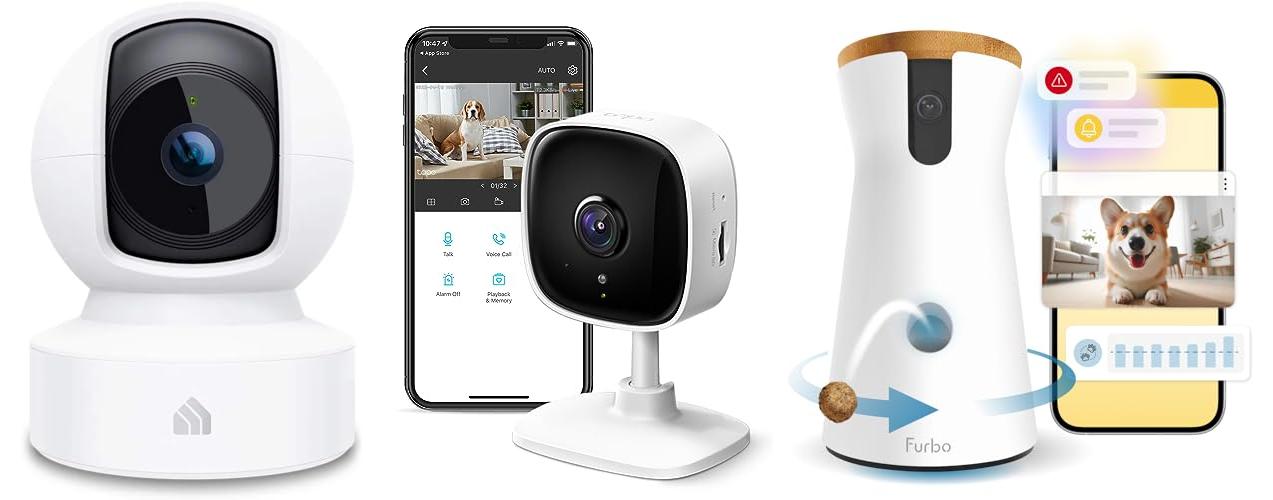
Do you ever wonder what your dog does all day while you’re away? Are they lounging on the couch like a furry king or queen? Or are they getting into mischief, like chewing on your favorite shoes? The truth is, we often miss out on the best part of our dog’s day. We miss their silly antics and sweet moments. But what if you could peek in on them, even when you’re miles away?
Choosing a dog camera can feel overwhelming. There are so many different types. You have to consider things like video quality, treat-tossing features, and two-way audio. It can be a real headache trying to find the perfect one. Plus, nobody wants to waste money on a camera that doesn’t work well or isn’t right for their dog’s needs.
This blog post is here to help! We’ll break down everything you need to know about dog cameras. You’ll learn the key features to look for and how to choose the best one for you and your furry friend. By the end, you’ll be ready to make a smart choice and start watching your dog live their best life. Get ready to discover the world of dog cameras and find the perfect way to stay connected with your pup!
Our Top 5 Dog Camera Recommendations at a Glance
Top 5 Dog Camera Detailed Reviews
1. Kasa Indoor Pan/Tilt Smart Security Camera

Rating: 8.8/10
The Kasa EC70 is a smart indoor security camera. It helps you keep an eye on your home. The camera has a pan and tilt function. This lets you see more of the room. It records in 1080p HD for clear video. You can use it as a baby monitor or a pet camera. It works with Alexa and Google Home. You can store videos on a microSD card or in the cloud.
What We Like:
- You can see live video from anywhere on your phone.
- The camera has motion and sound detection. It sends alerts to your phone.
- It has night vision so you can see in the dark.
- You can store videos on a local SD card.
- It works with other smart home devices through Smart Actions.
What Could Be Improved:
- Cloud storage requires a subscription.
The Kasa EC70 is a good security camera. It is easy to use and has many helpful features. It is a great option for anyone wanting to monitor their home.
2. TP-Link Tapo 1080P Indoor Security Camera for Baby Monitor

Rating: 8.8/10
The TP-Link Tapo C100 is a versatile indoor security camera that does a lot. It can be a baby monitor, a dog camera, or just a way to keep an eye on your home. This camera has great features like motion detection, two-way audio, and night vision. It also works with Alexa and Google Home, which makes it easy to use. You can store videos on the cloud or a microSD card. It is a good choice for keeping your home safe.
What We Like:
- Get alerts when something moves. The camera tells you if it sees a person or hears a baby crying.
- Talk to people through the camera. You can use it to talk to your pet or scare away unwanted visitors.
- See what’s happening even at night. The night vision works up to 30 feet away.
- The video is clear. You can see all the details in 1080P HD.
- It works with Alexa and Google Home. You can use your voice to see the camera’s view on your smart devices.
What Could Be Improved:
- The camera is not weatherproof, so it can only be used indoors.
- Cloud storage may require a subscription.
The TP-Link Tapo C100 is a good option for home security. This camera provides many useful features for the price.
3. Furbo 360° Dog Camera – Unlock with Paid Plan: Home Security & Dog Safety Alerts

Rating: 8.9/10
The Furbo 360° Dog Camera lets you watch and care for your dog, even when you are not home. This smart camera gives you peace of mind. It has a rotating treat dispenser, a 2-way speaker, and sends alerts to your phone. You can see your dog, talk to them, and give them treats from anywhere. It uses the Furbo app on your phone. A paid subscription is needed to unlock all the features.
What We Like:
- Keeps your dog safe with alerts for barking, activity, and emergencies.
- Lets you see, talk to, and give treats to your dog from your phone.
- Furbo Nanny uses AI to watch your pet and give you smart insights.
- Helps you track your dog’s activity to help with their health.
- Easy to set up and uses a secure connection.
What Could Be Improved:
- A paid subscription is required to use the camera.
- You need to connect to 2.4GHz WiFi, not 5GHz.
- If you already have a Furbo, you may need to upgrade.
The Furbo 360° Dog Camera is a great way to stay connected with your dog. It gives you peace of mind knowing your dog is safe and happy.
4. Cinnado Security Camera Indoor-2K 360° WiFi Cameras for Home Security,Pet/Dog/Baby Camera with Phone app

Rating: 8.7/10
The Cinnado Security Camera Indoor-2K is a smart home security camera. It helps you keep an eye on your home, pets, and babies. This camera has a 2K resolution for clear video. It also has 360° monitoring so you can see everything. You can talk through the camera using your phone. It works with Alexa and Google Home.
What We Like:
- Crystal clear 2K video lets you see everything in detail.
- The camera rotates 360° so you can see the whole room.
- You can talk to people through the camera using the 2-way audio.
- It has night vision so you can see in the dark.
- You get alerts on your phone when motion is detected.
- It works with Alexa and Google Assistant.
- You can store videos on an SD card or in the cloud.
What Could Be Improved:
- It only works with 2.4Ghz WiFi, not 5Ghz.
- It is a wired camera, so it needs to be plugged in.
The Cinnado Security Camera is a good choice for home security. It offers many useful features to keep your home and family safe.
5. Blink Mini 2 (Newest Model) — Home Security & Pet Camera(s) with HD video

Rating: 9.3/10
The Blink Mini 2 is a tiny but mighty smart security camera. It helps you keep an eye on your home. You can see and talk to people through your phone. It has great features like HD video, color night vision, and motion alerts. It’s easy to set up and works with Alexa. This is a great way to protect your home and pets.
What We Like:
- See what’s happening in 1080p HD.
- See color night vision with the built-in spotlight.
- Talk to people with two-way audio.
- Get alerts when motion is detected.
- Use it outside with the weather-resistant power adapter (sold separately).
- Set it up quickly.
- Use it as a doorbell chime with the Blink Video Doorbell.
- Save video clips with a subscription or a Sync Module (sold separately).
- Works with Alexa.
What Could Be Improved:
- Continuous live streaming requires a subscription.
- Some features, like person detection, need a subscription.
The Blink Mini 2 is a solid choice for home security. It offers many features for a good price. You can protect your home with this camera.
Dog Camera: Your Guide to Seeing Spot When You’re Not!
Do you miss your furry friend while you’re away? A dog camera lets you see, hear, and sometimes even talk to your dog! This guide will help you pick the best one.
Q: What are the main Key Features?
A: You want a dog camera with cool features. Look for these:
- Two-Way Audio: This lets you talk to your dog! You can tell them to stop barking or say “good boy!”
- Video Recording: Record fun moments. You can save videos of your dog playing or sleeping.
- Night Vision: See your dog even when it’s dark. This is super helpful at night.
- Treat Dispenser: Some cameras can launch treats! This is a fun way to reward your dog.
- Wide-Angle Lens: This lets you see more of the room. You want to see as much of your dog as possible.
- Motion Detection: The camera sends alerts when your dog moves. This helps you know what’s happening.
- App Control: A good app makes it easy to use your camera. You can control it from your phone.
Q: What are the Important Materials?
A: Good materials make a good camera. Look for these things:
- Durable Plastic: The camera should be made of strong plastic. It needs to handle bumps and knocks.
- Rubber Feet: Rubber feet keep the camera from sliding. They can help it stay in place.
- Good Quality Lens: The lens should be clear. You want to see your dog clearly.
Q: What Factors Improve or Reduce Quality?
A: Some things make a dog camera better. Others make it worse.
- Better Resolution: A higher resolution means a clearer picture. Look for 1080p or higher.
- Good Wi-Fi Connection: The camera needs a strong Wi-Fi signal. A weak signal makes the video blurry.
- Easy-to-Use App: The app should be easy to understand. If it’s hard to use, you won’t enjoy the camera.
- Customer Reviews: Read what other people say about the camera. This can tell you if it’s good or bad.
- Price: More expensive cameras often have better features. But, you can find good cameras at a lower price.
Q: What is the User Experience and Use Cases?
A: How will you use a dog camera? Here are some ways:
- Checking In: See what your dog is doing while you’re at work. Is he happy? Is he sleeping?
- Training: Use the camera to correct bad behavior. You can use the two-way audio to tell your dog “no.”
- Entertainment: Watch your dog play! It’s fun to see what they do when you’re not around.
- Treat Dispensing: Reward your dog with treats. This can help with training.
- Peace of Mind: Know that your dog is safe and happy. This is a big benefit.
Q: How do I set up a dog camera?
A: Setting up a dog camera is usually easy. You will need to plug it in and connect it to your Wi-Fi. Then, download the app and follow the instructions.
Q: Can I use a dog camera outside?
A: Most dog cameras are for indoor use. Some cameras are made for outside. These are weather-resistant.
Q: How much does a dog camera cost?
A: Dog cameras range in price. You can find basic cameras for under $50. More advanced cameras can cost over $200.
Q: How safe are dog cameras?
A: Dog cameras are generally safe. Make sure to choose a camera from a trusted brand. Also, use a strong password for your Wi-Fi.
Q: Does my dog need to be trained to use a dog camera?
A: No, your dog doesn’t need training. They may be curious at first. They will get used to it quickly.
Q: Can I use a dog camera with multiple dogs?
A: Yes, you can use a dog camera with multiple dogs. You can see them all at once!
In conclusion, every product has unique features and benefits. We hope this review helps you decide if it meets your needs. An informed choice ensures the best experience.
If you have any questions or feedback, please share them in the comments. Your input helps everyone. Thank you for reading.